

Estimated reading time : 6 min · Published
Separate an empty query, no results and a service fault
Situations showing little content can need different responses. Explain what is known and leave a clear next action.
- Query
Visitors can enter terms and understand the search scope.
- Processing
The site applies its agreed search rules.
- Results
The list and state match the current query.
- Recovery
People can rephrase, remove a filter or open a resource.
Fictional teaching scenarios to adapt to your system. This page performs no operation on your website.
Open the situation you want to check
The field is empty
- What is known
- No specific question has been supplied yet.
- The next check
- Decide whether to show help or an initial list; do not arbitrarily describe this as a failed search.
The search succeeds with no match
- What is known
- Processing responded, but no content meets the rules used.
- The next check
- Announce no results and offer rephrasing or filter clearing while retaining useful context.
The service does not respond
- What is known
- Missing results do not establish that relevant content is absent.
- The next check
- Show a clear fault message and a recovery path without claiming no resources exist.
A filter reduces results during pagination
- What is known
- The fictional dataset has 24 results at 10 per page. From page 3, a filter keeps only 3 results.
- The next check
- Under this test’s rule, return to page 1 and show those 3 results. An emptied page 3 does not justify announcing that the search found nothing.
- Evidence to retain
- Fictional query and filter, page 3 then page 1, announced total and three displayed items; also check the accessible status message.
Technical reference : W3C WAI · ARIA22 · Consulted .
Check that search solves a real problem
On a small site, clear navigation and a few filters may be enough. Search becomes valuable when the volume, variety or audience vocabulary makes browsing difficult. Collect examples of real questions before choosing a tool.
Decide what is searchable: products, articles, resources, services or documents. Keep public content separate from private material. A search tool that indiscriminately covers everything can return irrelevant results or reveal titles that should not be exposed.
- Ten queries from real tasks.
- Included and excluded content types.
- A browsing path that works without search.
Prepare the data and vocabulary
Every result needs a distinctive title, faithful summary, stable URL and useful category where appropriate. Fix pages with vague titles before tuning ranking. Note synonyms visitors actually use, including everyday words that differ from internal terminology.
Define the handling of misspellings, accents, plurals and variants through testable examples. Overly broad equivalences can hide the right result. Test ambiguous words across several content families rather than claiming the engine understands every intention.
- Distinctive titles and excerpts.
- Short, validated synonym list.
- Ambiguity cases for testing.
Make the form and results understandable
The input needs an accessible label, clear submit action and keyboard operation. Show the executed query and result count without suggesting that an approximate ranking is an exact answer. Each card should explain the match with a title, content type, short excerpt and date if freshness matters.
If filters help, show active criteria and let people remove them easily. Test pagination, browser history and narrow screens. The W3C form accessibility tutorial also applies to search input.
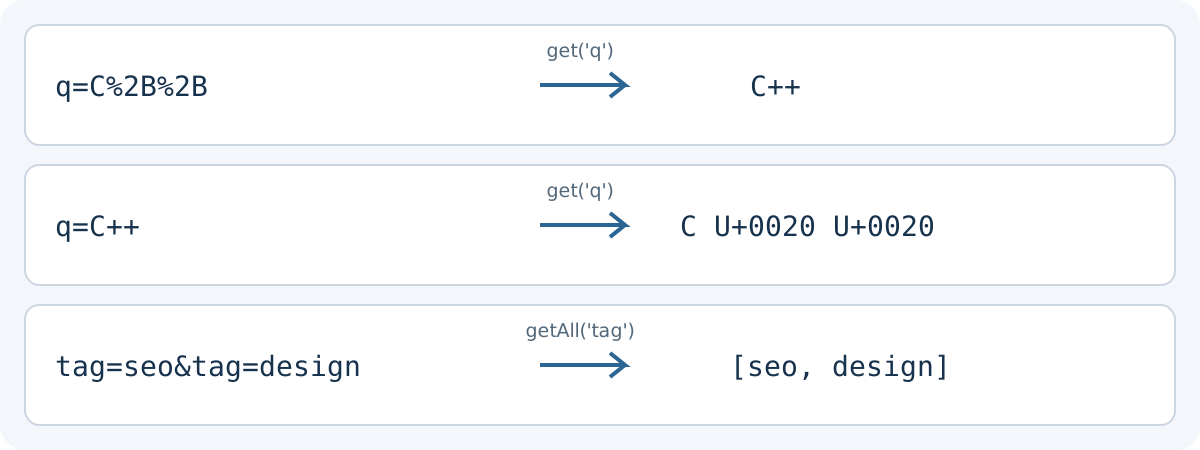
Test the received value, not only the address bar. In this exercise URLSearchParams decodes q=C%2B%2B as C++, but q=C++ as C followed by two U+0020 spaces. A raw plus means a space in this parameter format; %2B means a literal plus. Build name/value pairs with the API instead of concatenating input. Then check what the server actually receives: its parser may follow a different contract.
Keep distinctions that affect the task. For tag=seo&tag=design, getAll reads both values in order; get returns only the first. q= is present but empty, whereas an absent q returns null with get. Decide whether these states should behave alike. The API defines neither synonyms, filter logic nor result relevance. Reload the link and use Back to check that the selected criteria are restored.
- Explicit search label.
- Results understandable without images.
- Filters and browser Back tested.
Scroll the table horizontally to read every column. With a keyboard, focus the table area and use the arrow keys.
| Parameter string | Read method | Returned value |
|---|---|---|
| q=C%2B%2B | get('q') | C++ |
| q=C++ | get('q') | C + U+0020 + U+0020 |
| tag=seo&tag=design | getAll('tag') | ["seo", "design"] |
| q= | get('q') / has('q') | "" / true |
| No parameter | get('q') / has('q') | null / false |
Handle zero results and errors
An empty page should not end the journey. Repeat the query and suggest checking spelling, removing a filter or browsing relevant categories. Do not invent irrelevant matches just to avoid showing zero. If the search service fails, explain that it is temporarily unavailable and keep another navigation route.
Test empty and very long queries, punctuation and characters used by every published language. On a multilingual site, confirm which language is being searched and do not silently mix untranslated results.
- No-result state with concrete options.
- Technical failure distinguished from zero results.
- Tests in every supported language.
Use queries to improve the website
Review frequent searches, no-result queries and searches followed by an immediate exit. They may reveal missing content, an unclear title or weak navigation. Retain only the data necessary under the measurement policy applicable to your site.
Judge fixes by the task: can someone now find the right page and complete the next action? Correct the data and presentation before adding complex ranking rules. The measurement guide helps connect observations to decisions.
- No-result queries reviewed.
- Missing or poorly named pages identified.
- Task retested after each correction.
Check suggestions and delayed responses
Where search offers suggestions, check free text versus an accepted value. Make two quick edits with delayed replies: the first response must not replace the second. Announced totals should belong to the latest applied request.
Empty input, no match and service failure need different messages. Offer a useful next step: refine a term, remove a filter or retry loading. Result announcements should not automatically move people away from the control they are adjusting.
Design autocomplete for selecting a value · Write and announce interface status messages · Choose interface links, buttons and actions
Test search without jargon

Proposed case: a visitor searches for “change address” while the page uses an administrative term. Perfect technical matching may leave the task undiscoverable.
Prepare public-worded queries and inspect results, titles and no-answer cases. Document synonyms and useful destination; adding terms does not replace observing ranking.
- Record the public's words
- Check the proposed destination
- Test a no-results query
- Keep filters understandable
Design useful filters for a catalogue or directory
Define a small set of expected search results
Fictional catalogue: A = guide “Website security”, B = service “Website creation”, C = guide “Prepare a contact page”. Exercise rules: ignore case and accents, require every word in the title, and apply filters in addition to text. These rules do not describe every search engine.
Scroll the table horizontally to read every column. With a keyboard, focus the table area and use the arrow keys.
| Query and filter | Expected result | What the test checks |
|---|---|---|
| security · no filter | A only: 1 result. | The agreed title-word matching. |
| website · no filter | A and B: 2 results. | Matching a word shared by entries of different types. |
| website · guides only | A only: 1 result. | Combining text with the category filter. |
| hosting · no filter | None: 0 results. | An explained empty result, distinguished from a service fault. |
- W3C WAI · ARIA22
After an applied change, the count should describe the current list. W3C technique ARIA22 illustrates a status announcement without moving focus; it does not define a search algorithm.
Reference documents
- W3C WAI · ARIA22 · Source consulted
- W3C WAI : Menus Tutorial · Source consulted
- WHATWG : URL Standard: URLSearchParams · Source consulted
- W3C form accessibility tutorial
Content updated on