

Estimated reading time : 4 min · Published
Verify the property and important pages
Confirm the property covers the correct domain variants and that the people responsible have suitable access. Submit the public sitemap and list priority pages: services, products, contact, guides and language versions.
Google’s Search Console guide explains performance and indexing reports. A missing or incomplete report alone does not prove a page is broken; check the URL and rendered page too.
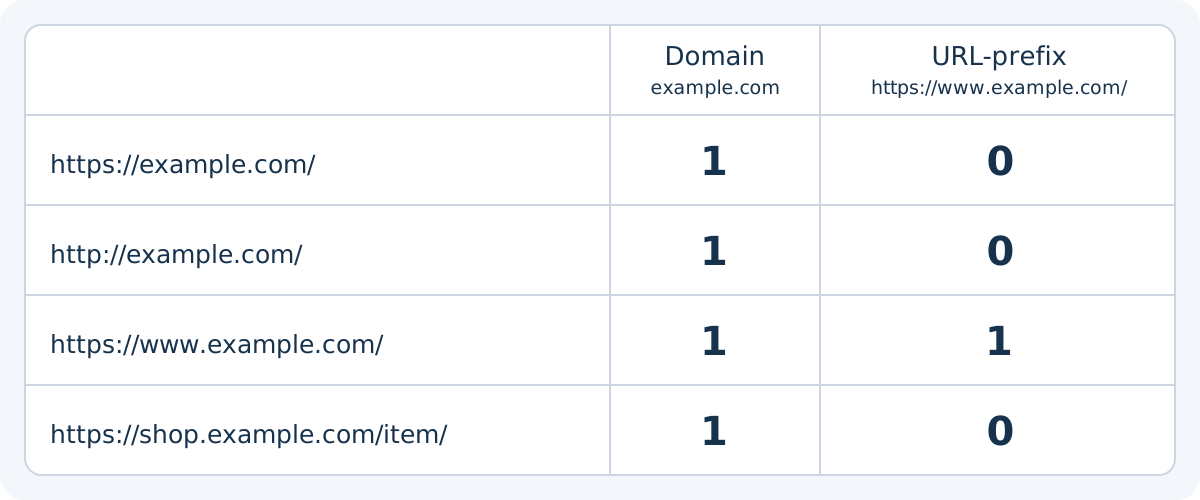
Check the selected scope before interpreting an empty report. A Domain property example.com covers its subdomains, paths and protocols; a URL-prefix property https://www.example.com/ covers only that prefix, including protocol. In the exercise below, http://example.com/ and https://shop.example.com/item/ belong to the first scope, not the second. These are teaching addresses, not real site properties or performance data. Adding a property does not change the site’s Google ranking.
Distinguish creation, verification and delegated access. For an ordinary website Domain property, documentation specifies DNS verification; URL-prefix properties offer several methods. Some Google products have special cases. Someone already granted access by an owner can select the property without repeating creation. Before inspection, check that the address belongs to the open scope and your access permits it. Absence from an overly narrow scope proves neither an outage nor lack of demand.
- Property and access checked.
- Public sitemap verified.
- Priority pages listed.
Scroll the table horizontally to read every column. With a keyboard, focus the table area and use the arrow keys.
| Exercise address | Domain example.com | Prefix https://www.example.com/ |
|---|---|---|
| https://example.com/ | Within scope | Outside scope |
| http://example.com/ | Within scope | Outside scope |
| https://www.example.com/ | Within scope | Within scope |
| https://shop.example.com/item/ | Within scope | Outside scope |
Read trends before isolated numbers
Compare consistent periods and segment by page, query, country and device according to the question. An impression means a result was shown, not that someone read the page. A click does not prove that the visitor found an answer.
Connect changes to a publication, season, title edit or known incident. The measurement guide relates visibility to enquiries and other real outcomes.
Fictitious teaching example, with no client data: over the same period and filters, page A receives 100 clicks from 1,000 impressions and page B receives 90 clicks from 9,000 impressions. Their click-through rates are 10% and 1%. For this set of page rows, the calculated rate is 190 / 10,000 × 100 = 1.9%. The simple average of the rates, 5.5%, gives equal weight to very different volumes and is unsuitable here.
This calculation applies only to the rows and scope defined in the example. In Search Console, page and property groupings may count a presentation of several results differently. Summing rows therefore does not necessarily reconstruct the chart. Distinguish a calculation over comparable rows, the report total and a business outcome measured elsewhere; a higher CTR alone does not demonstrate more enquiries.
- Comparable periods used.
- Pages and queries reviewed together.
- Hypotheses documented before changes.
Scroll the table horizontally to read every column. With a keyboard, focus the table area and use the arrow keys.
| Teaching set | Clicks / impressions | Reading the result |
|---|---|---|
| Page A | 100 / 1,000 | 10% CTR for this row. |
| Page B | 90 / 9,000 | 1% CTR for this row. |
| Set of these two rows | 190 / 10,000 | 1.9%; weighted by impressions. |
| Simple average of the two rates | (10% + 1%) / 2 | 5.5%; this calculation does not represent the set’s rate. |
- Google Search Console : Performance report
Consulted on 22 October 2026; CTR definition and property versus page aggregation. Table values are fictitious.
Examine exclusions with judgement
Not every discovered URL should be indexed. A filter page, redirect or duplicate may normally be excluded. A missing essential service page or repeated server error deserves targeted inspection.
Open the affected URL and check its status, canonical, internal links and rendered content. Fix the cause before requesting another crawl. The prelaunch checklist complements this process.
- Expected exclusions separated from faults.
- URLs inspected individually.
- Cause fixed before recheck.
Build a short useful routine
Review a few pages and known events regularly instead of scanning the whole dashboard without a question. Keep a record of new pages, migrations, seasonal changes, technical faults and content revisions.
After a fix, allow time for search systems to respond and measure the affected page. Search Console describes Google Search; use other real-world feedback to judge whether the website helps people.
- Short review scheduled.
- Changes recorded.
- Outcome observed without hasty attribution.
Reference documents
- Google Search Console : Performance report · Source consulted
- Google Search Console : Add a property · Source consulted
- Google’s Search Console guide
Content updated on
Documented reference points for this topic
| Reference | Value or syntax | Scope |
|---|---|---|
| Google Search · Canonical | rel="canonical" | A preference signal for Google; neither a redirect nor a selection guarantee. |
| Google Search · Sitemap | 50 000 URL · 50 MB | Limits per uncompressed file; larger sets require several sitemaps. |
Dates indicate when references were consulted. These facts are neither a site audit nor an overall compliance statement.