

Estimated reading time : 4 min · Published
Describe what subscribers will receive
State the topics, usual frequency and sender before the form. Do not promise rare expert advice when actual messages are mainly promotional. Show a recent example when one exists.
Separate a newsletter from messages needed for an order or service. Needs and applicable rules may differ; ask the responsible person to validate the journey. The service-page guide helps form a clear promise.
- Topics and frequency stated.
- Sender identifiable.
- Promise matches actual emails.
Reduce friction without hiding choice
Request information needed for sending and explain offered preferences. Fictional example: a monthly newsletter and event alerts exist; name them separately so readers understand their choice. An optional first name does not justify a detailed profile. Test labels, keyboard use, mobile display and correction of a mistyped address without losing the selected list.
After submission, show a clear state: request received, verification needed or error to correct. Test duplicates, mistyped addresses and delivery delays. The form guide covers errors and notifications.
- Fields proportionate.
- Confirmation state clear.
- Errors correctable without unnecessary re-entry.
Test first emails and exit
Check sender identity, subject, mobile layout, links, blocked images and a text version if offered. A welcome message can restate what was requested but should not start an unexpected sequence.
Use the unsubscribe link in every template. It should lead to an understandable action and remove the address from future sends as described. Document multiple lists and preferences so leaving one stream actually stops it.
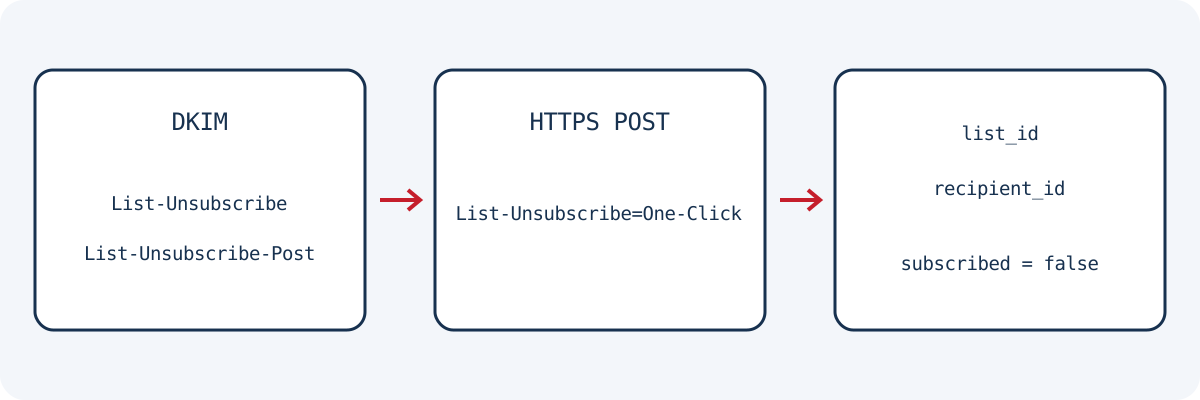
Fictional case: your provider implements RFC 8058 one-click unsubscribe. The visible message link and the mail client’s command are two separate checks. For this mechanism, List-Unsubscribe contains an HTTPS URI and List-Unsubscribe-Post carries List-Unsubscribe=One-Click. After the person’s choice in the mail client, an HTTPS POST sends that pair in its body. The URI must identify the list and recipient without asking for login or another manual confirmation.
The RFC requires a valid DKIM signature covering both headers and prohibits an HTTPS redirect for this POST. The request must include neither cookies nor HTTP authentication. With test identities, distinguish GET prefetch, POST request and stored state: a 200 alone does not prove unsubscribe. Also check exclusion from the next relevant campaign and no reactivation by an old import. URI tokens need not appear in shared screenshots or logs; this technical exercise does not define your marketing’s legal rules.
- First email consistent.
- Links and mobile view checked.
- Unsubscribe tested end to end.
Scroll the table horizontally to read every column. With a keyboard, focus the table area and use the arrow keys.
| Fictional check | Technical reference | Expected result |
|---|---|---|
| Visible link in the email | Journey announced to the reader | An understandable exit tested in each template |
| Automatic URI prefetch | GET does not demonstrate a human choice | No accidental unsubscribe in this scenario |
| One-click command chosen by the person | HTTPS POST; List-Unsubscribe=One-Click | The correct list is processed without login or another manual step |
| Authentication and final verification | DKIM covers both headers | Valid signature and actual exclusion from the relevant campaign |
Judge usefulness without inflating counts
Separate subscription requests, any confirmation step and active subscriptions. Fictional example: one hundred requests include duplicates and invalid addresses; the total does not represent one hundred new readers. Observe errors, unsubscribes and useful replies over a known period. Volume growth is insufficient if delivered content differs from the promise made before signup.
Connect campaigns to an editorial calendar and revise signup pages when the programme changes. Retention periods and evidence obligations depend on context and need a decision by the responsible person, not a copied generic deadline.
- Confirmed signups measured.
- Feedback and exits reviewed.
- Promise updated with the programme.
Reference documents
Content updated on